



Warm Autumn Apartment Style Unpacked
The "Weekly Room – App Track" challenge revolves around two templates — “The Autumn Arch Room” and “The Meadow Loft Room”. Across the winning and popular entries, a clear stylistic direction emerges: a warm, contemporary apartment style that blends neutral palettes, natural textures, and cozy layering. Think sun‑lit city flats with soft fabrics, stone or wood accents, and curated decor that feels both modern and lived‑in. This style is highly adaptable, which is why it works equally well for bedrooms, living rooms, home offices and even bathrooms, as seen in entries like “Zen Bath”, “Stone's Stories” and “Elegant Retreat”. In Homestyler, designers start from these templates and then customize surfaces, furniture and decor to create unique, yet consistently warm, spaces.

Above, afrah alwy's work Home Office is a great example of this warm autumn apartment style: a neutral base, simple contemporary furniture, and carefully placed decor create a calm yet productive atmosphere. Using Homestyler’s 3D rendering tools, it’s easy to replicate this look — start from an apartment template, apply light wood finishes, add a comfortable reading chair, desk and floor lamp, then preview lighting and materials in real time until the room feels just as inviting.
Start Free Design NowCore Elements of the Warm Apartment Style
Soft Neutral Color Harmony 🎨
Across the contest entries, color is the first thing that sets the mood. The warm apartment style relies on a base of soft neutrals — beige, cream, warm gray and light taupe — punctuated by earthy accents like terracotta, olive green and wood tones. This palette makes bedrooms and living rooms feel cozy without becoming visually heavy. In “Stone's Stories” and “Elegant Retreat”, for example, bedding, rugs and upholstered pieces stay in a soft neutral range, while stone walls, wood wardrobes and greenery add depth. This balance keeps the rooms bright for daytime living but snug enough for relaxation at night. In Homestyler, you can rapidly test such palettes by swapping wall paints, floor finishes and fabric materials from the material library, then using real‑time 3D rendering to evaluate how morning or evening light interacts with your chosen colors.

In Sevenseas 96's bedroom design Stone's Stories, the soft beige textiles and light wood tones are beautifully contrasted by the textured stone wall and abundant greenery. Homestyler’s 3D rendering engine allows you to combine these materials quickly and see how they harmonize, helping you fine‑tune a warm, natural palette before any real‑world renovation begins.
Begin Cozy Bedroom DesignComfort‑First Spatial Layout 🛋️
Structurally, this style favors clear, practical layouts that prioritize comfort and daily routines. Beds, sofas and desks are oriented toward windows and light; circulation paths are kept simple; storage is integrated into walls or sleek cabinets to avoid clutter. In “Elegant Retreat”, the bed sits centrally with side tables and lamps framing it, while wardrobes are tucked neatly along the wall, and a small table maintains functionality without stealing space. In “Designing Tranquility”, seating is organized to encourage conversation, with the TV and staircase integrated cleanly into the living area. Homestyler makes optimizing these layouts straightforward: you can drag and drop furniture, test different bed and sofa positions, and switch between 2D and 3D views to ensure the room feels open yet intimate. Real‑time collision and measurement tools help you maintain comfortable distances, while the apartment templates give you a ready‑made starting structure.

In Sui San Xie's work Elegant Retreat, the spatial structure is calm and logical: a centered bed, balanced bedside tables, and streamlined wardrobes create a restful flow. With Homestyler, you can experiment with similar bedroom layouts, adjust furniture sizes and positions in 3D, and instantly see how these decisions impact comfort and circulation.
Create Elegant Bedroom LayoutCurated Cozy Decor & Natural Textures 🌿
Decoration completes the warm apartment aesthetic. Rather than over‑styling, designers in this contest use a curated mix: artwork over beds or sofas, indoor plants, textured rugs, throws, and warm lighting from table, floor and pendant lamps. Natural textures — stone walls, wood furniture, woven fabrics — are crucial to keeping the spaces inviting instead of sterile. “Designing Tranquility” and “uomo solitario” both showcase this approach: stone or wood accent walls anchor the rooms, while artwork and greenery soften the geometry. Lighting fixtures become visual focal points and mood setters. In Homestyler, you can quickly apply these decor principles by choosing from the extensive model library of plants, lamps, art frames and textiles. The 3D rendering tool lets you adjust light temperature, intensity and direction to achieve a cozy ambiance, and you can test multiple decor combinations non‑destructively until the room feels perfectly layered and personal.

In Naghmeh D's living room Designing Tranquility, layered decor — artwork, plants, a soft rug and warm lamps — turns a modern layout into a genuinely cozy space. Using Homestyler’s 3D tools, you can emulate this by placing decor elements, testing different rug patterns and wall art, and instantly rendering the result to see how the textures and lighting interact.
Design Your Cozy Living RoomFAQ About Creating This Style in Homestyler
Q1: How can I quickly start a warm apartment design in Homestyler?
You can begin by opening one of the official templates used in the contest, such as “The Autumn Arch Room” or “The Meadow Loft Room”. These give you a ready‑made apartment layout. From there, use Homestyler’s material and furniture libraries to apply warm neutral colors, add wood and stone textures, and place key furniture like sofas, beds and desks. Real‑time 3D rendering lets you preview your design instantly, so you can iterate until the space feels as cozy as the featured entries.
Q2: How do I test different color palettes without rebuilding the room?
In Homestyler, you can simply switch paint colors, floor finishes and fabric materials directly on the 3D model. Use the material panel to replace wall colors and surfaces, then render the scene to compare options under different lighting scenarios. This makes it easy to move from cooler neutrals to the warmer, autumn‑inspired palette seen in designs like “Stone's Stories” and “Elegant Retreat” without changing the underlying layout.
Q3: How can I check if my furniture layout is comfortable and practical?
Homestyler offers precise measurement tools and both 2D and 3D views. Place your furniture in the apartment template, then use the 2D plan to check clearances around beds, sofas and desks. Switch to the 3D view to walk through the space virtually and ensure circulation feels natural. This workflow mirrors how contest entries optimized their structures to keep rooms open yet intimate.
Q4: How do I create the cozy lighting seen in the contest entries?
Use Homestyler’s lighting tools to add table lamps, floor lamps and pendant fixtures from the model library, then adjust light temperature toward warm tones. In rendering settings, you can simulate daylight from windows and evening light from fixtures, helping you fine‑tune the ambiance until it matches the inviting feel of works like “Home Office”, “Designing Tranquility” or “uomo solitario”.
Originally incubated at Autodesk, Homestyler has grown into one of the most widely adopted home design platforms in the world, now trusted by over 20+ million registered users (platform data, 2026). Whether you're a homeowner exploring ideas or a professional designer delivering client-ready renders, Homestyler brings industry-leading 3D technology to your fingertips — no experience required.

Minimalist Solid Oak Nightstand with Gold Hardware and Lower Shelf 3D Model
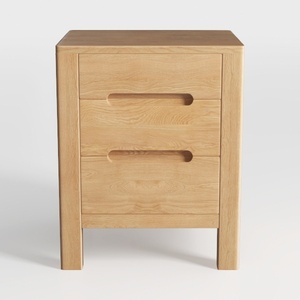
Minimalist Solid Oak Nightstand With Hidden Pull Handles 3D Model

Minimalist Solid Oak Tall Narrow Storage Cabinet With Drawers 3D Model
Homestyler is an easy-to-use online home design platform that lets you create stunning 3D renderings, explore a variety of interior design projects, and learn through helpful DIY video tutorials. It’s perfect for bringing your home design ideas to life quickly and creatively.
Дизайн сейчас бесплатно






